Posted on
Updated on
September 23, 2026
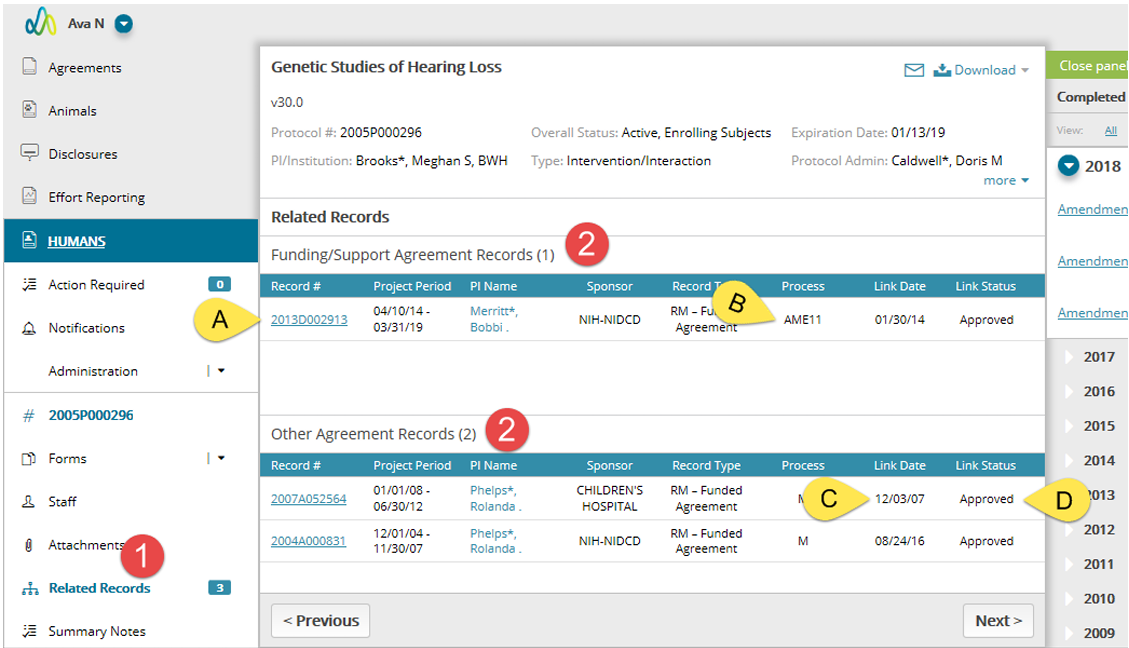
The Related Records page displays Agreement records, both funding and non-funding sources, that are linked to a protocol.
Steps
- To navigate to the Related Records page, click on the link in the left navigation.
- The page has two sections:
- Funding/Support Agreement Records are listed at the top. This list will also correspond to the Sponsors listed in the header of the protocol.
- Other Agreement Records are listed at the bottom. These consist of records which have no funding behind them. These are typically Material Transfer, Data Use and Confidentiality agreements. Although these records are also listed in the protocol header the Sponsor is not included.
- Each listed record will include some general information regarding the agreement record as well as:
- A link to the Agreement record.
- The process in which the link was added like Initial Review (IR) or Amendment (AME).
- The date in which the protocol to agreement linking was approved.
- The link status. This status will be Draft or Pending when the process to link the protocol to the agreement is still in progress.
To add additional funding sources, please Create an Amendment and add the Sponsor/Funding form. Other Agreement Records are linked directly from the Agreements themselves.