
September 21, 2026
Users can easily upload new attachments to transactions by selecting files from their computer folders or by dragging & dropping into the appropriate field.

INSTRUCTIONS FOR UPLOADING NEW DOCUMENTS
Note: For new studies requiring a Site Addendum, use the attachment type Site Addendum. The most recent templates of study documents need to be used, you can download the most recent templates here.
- Create a submission (New Protocol, Continuing Review/Amendment, Amendment, Other Event) in the Humans module.
- Fill out the submission form and select the Attachments tab on the left panel.
- A NEW attachment can be uploaded by:
- Dragging and dropping the document(s) onto the light green area as shown below. This can be done while another window is open at the same time.
- Click “select files from computer”, navigate to the location on your computer where the document exists and select the document(s).

- Once file(s) are uploaded, select the attachment type from the dropdown menu (Protocol Summary, Site Addendum, Detailed Protocol, Consent Form, Advertisement, Instrument Questionnaires, etc.).
- When you select Protocol Summary, Consent Form, Assent Form, Drug Brochure, Device Brochure, a Window will pop up and you will have to enter a version date for the document
- When you select Detailed Protocol, a window will pop up and you will have to enter a version name and date
- The version information provided must match the version information in the actual document

- Add a Description.
* The Submission Checklist in the right panel will indicate the attachment types that must be added to the protocol as well as documents missing version date.
INSTRUCTIONS FOR UPLOADING REVISED DOCUMENTS:
| Always start with the most recently approved version downloaded from Insight to submit additional changes. Never used versions saved to a computer outside of Insight on your own shared or personal drives. |
Note:
For documents created by the Investigator, the investigator should only upload marked copies (clean
copies should NOT be uploaded). This includes:
- Consent, assent, information sheets etc.
- Site Addendum
- Protocol Summary
- Investigator Detailed Protocol
The investigator should use the “tracked changes” feature in Word for documents that are not protected including the Consent Forms, Protocol Summary, Assent Forms.
The IRB staff will upload clean copies of these documents at the time of final approval. The clean copies will be unlocked for future editing by the investigator and will remain unlocked for the duration of the study.
For documents originating from the Sponsor or outside entities, the investigator should upload a marked and clean copy (or clean copy and summary of changes) at the time of submission. For example:
- Sponsor Protocol
- Drug/Device Brochures
How to Upload:
| Do NOT delete previously reviewed/approved documents from the attachments page. |
- Create a submission (Continuing Review/Amendment, Amendment, Other Event) in the Humans module.
- Fill out the submission form and select the Attachments tab on the left panel.
- Go to the attachment line for the already existing document you are revising and click the +
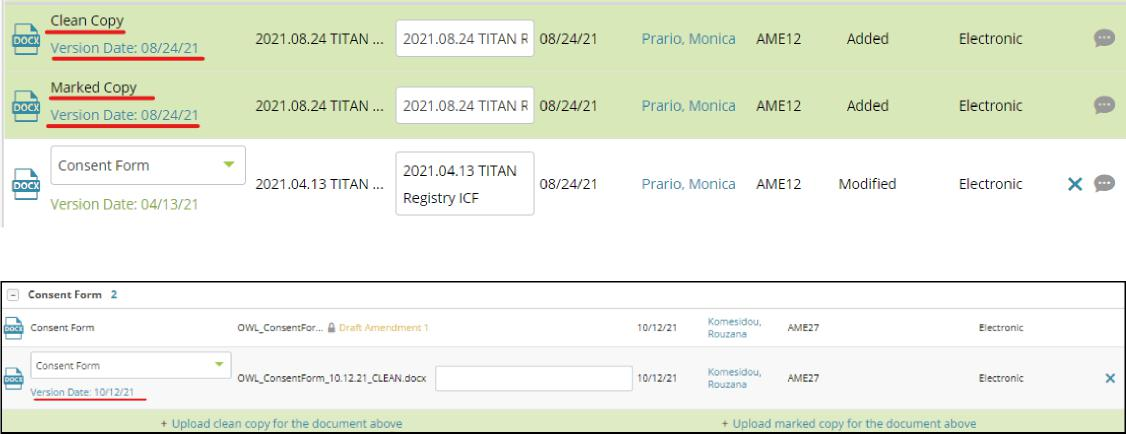
- You will be able to view and download the last approved version of the document with the options “Upload a marked copy for the document above” and “Upload a clean copy for the document above” as shown below.
- Make changes to the last approved version of the document and save a version of the revised document using the Tracked Changes feature in Microsoft Word. Contact the IRB if an unlocked copy of a document is needed.

- A revised document (marked and clean) can be uploaded by:
- Click “Upload marked copy for the document above” and navigate to the location on your computer where the document exists and select the document. Repeat the step for uploading the clean copy by clicking “Upload clean copy for the document above” as applicable.
OR
- Dragging and dropping the document(s) onto the corresponding area below the original document (“Upload a marked copy for the document above” or “Upload a clean copy for the document above”).
7. When you upload Marked/Clean copies, a window will pop up asking for the following:a. A Version Date for the
- Site Addendum
- Protocol Summary
- Consent Form/Assent Form
- Drug/Device Brochure
b. The Version number/name and date for the Detailed Protocol8. The version information provided must match the version information in the actual document.9. Once uploaded, your attachment(s) will display the marked and clean version on top of the original document as shown below.
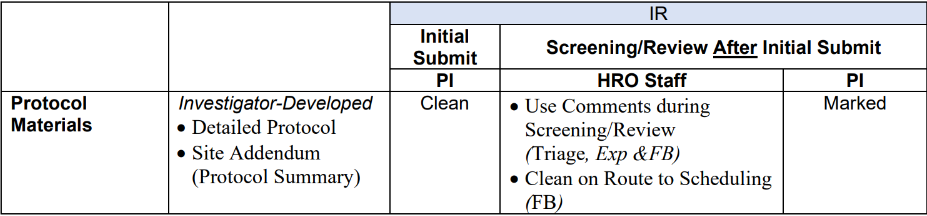
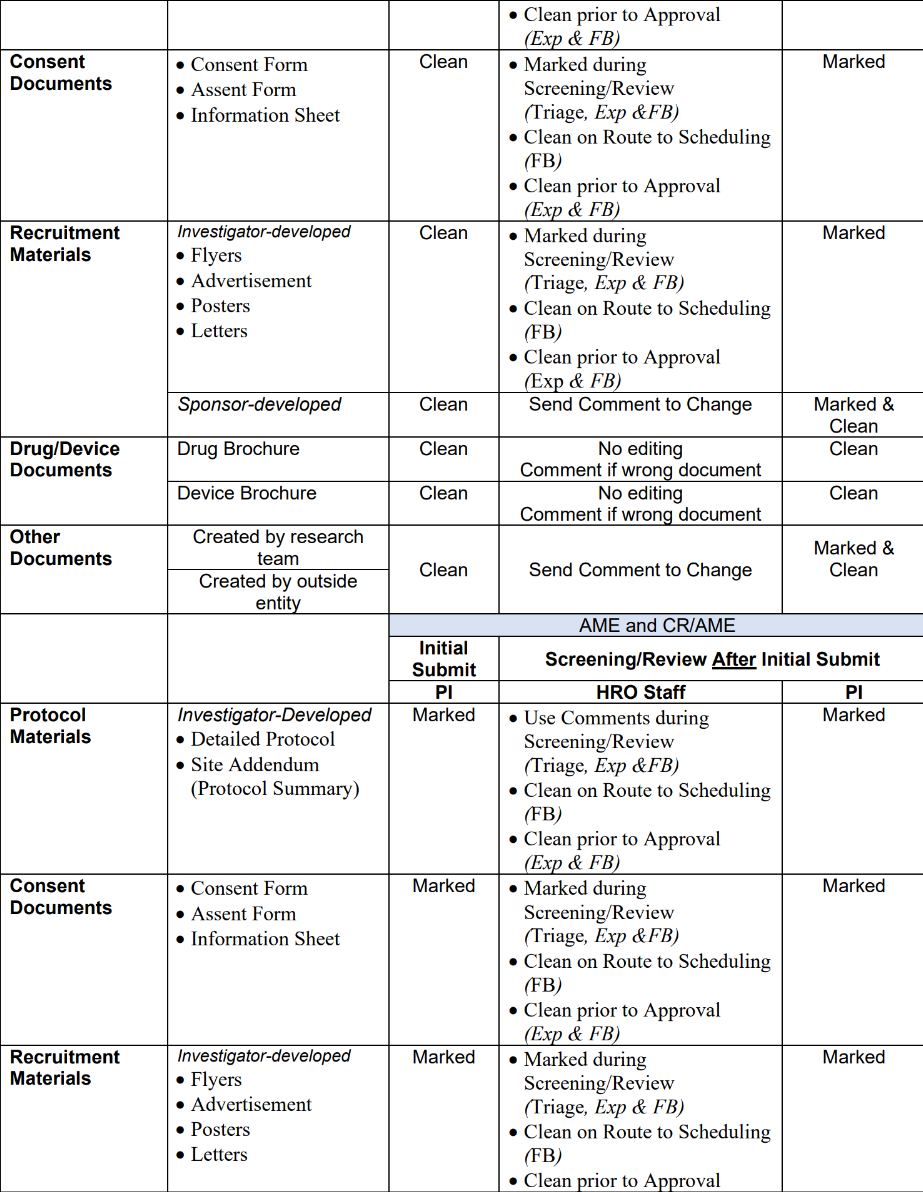
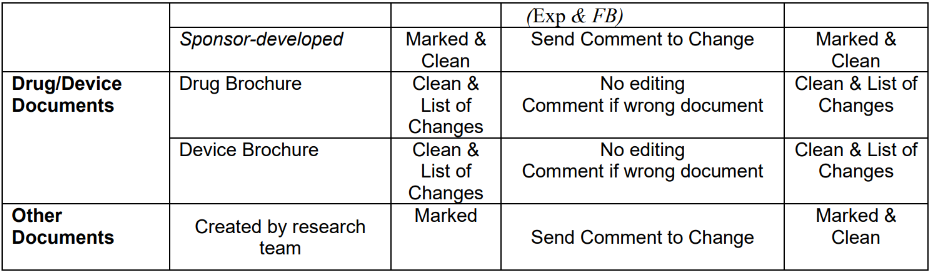
Attachment Requirement Table
The table below lists document types and specifies who is responsible for providing Clean and Marked/List of Changes during the submission, screening and review processes.
Published documents
The MGB IRB stamps only study documents with the following attachment types:
- Consent Form
- Assent Form
- Flyer
- Advertisement
- Poster