Posted on
Updated on
September 18, 2026
Introduction
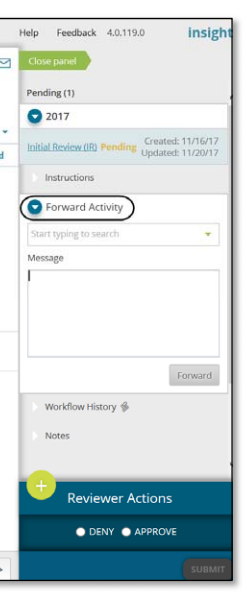
The Forward Activity feature available on the right panel provides users with the ability to forward the request currently in their queue to another user.
Forward Activity by a logged in User
- Logged in user can forward an activity to another user from right panel after opening the activity for the corresponding record.
- The Forward Activity section is collapsed by default and may not be available in all cases.
- Once the section is expanded, enter the name or login id of the user in the typeahead dropdown field to start searching.
- Select the user from the results.
- You can enter a message (optional).
- Click on Forward button to forward the activity.
- A green notification message is displayed at the top right corner stating the successful forward of the activity. You can also verify this from Workflow History section on right panel where a new step is added showing forwarded user and message details after activity is forwarded.
The activity can only be forwarded to one person. Once the activity is forwarded, the right panel becomes read only for user that forwarded the activity and you will now not be able to perform any reviewer actions.
|
Important Notes: Forwarding an activity to another user does not grant them access to the record. They must already have access or must request access in order to complete the activity. Many actions assigned to an Investigator (PI) cannot be forwarded to another user. All such actions should be completed by the assigned person itself. |