Posted on
Updated on
September 21, 2026
Users can view and assign contacts to a record from the Contacts page. Department Contact must be assigned in order to submit your action. If other contacts such as Pre Award Administrator or Collaboration Agreement Associate are blank and preventing you from submitting your transaction, please contact the Insight Help Desk and we will work with the appropriate central office to get the correct person assigned to the role.
STEPS
- Inside the Agreement record, click on Contacts in the left panel, which will show all contacts associated with the Agreement.
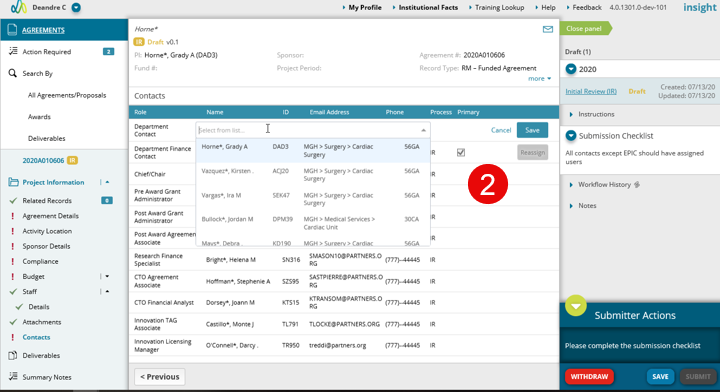
- Department Contact will not be assigned by default for new records. To assign a contact:
- Click Assign
- Select from the pre-determined list of contacts. This list is comprised of department administrators assigned via the Research Contacts page and users with access directly assigned to the PI’s portfolio (via the Security page of their profile in Manage Profiles & Security).
- Click Save.
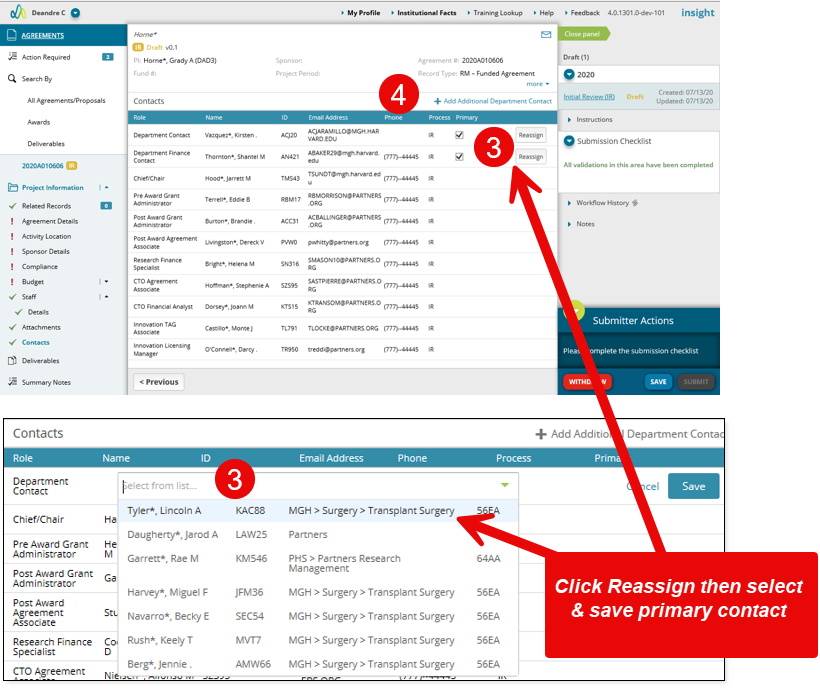
- If you need to reassign a contact for the agreement, click ‘Reassign’, select the new contact from the dropdown or by searching, then click Save.
- To add an additional Department Contact, click the link as shown.
| Note: if a contact is missing in the Department Contact or Department Finance Contact, the keygiver for the department will need do add the person after providing them security. Click here for more information on finding the appropriate keygiver. |