
Posted on
Updated on
September 23, 2026
Introduction
This guide explains how keygivers grant users access to another individual’s Insight portfolio for selected modules. Add profiles to identify whose portfolios the user can access. In the Agreements module, users can also complete activities as delegates, except for PI-specific compliance functions such as Agreement approvals and Conflict of Interest (COI) activities.
Users always retain access to their own portfolios.
| Note: if you are not a keygiver but need Insight access, click here for instructions on requesting access. |
Steps
- Locate the user:
- Use the name field to enter “last name, first name” or User ID to locate the user you need to review/update.
- Click Search.
- When results are returned, click on the user’s name to open their profile.
- Navigate to the Security page.
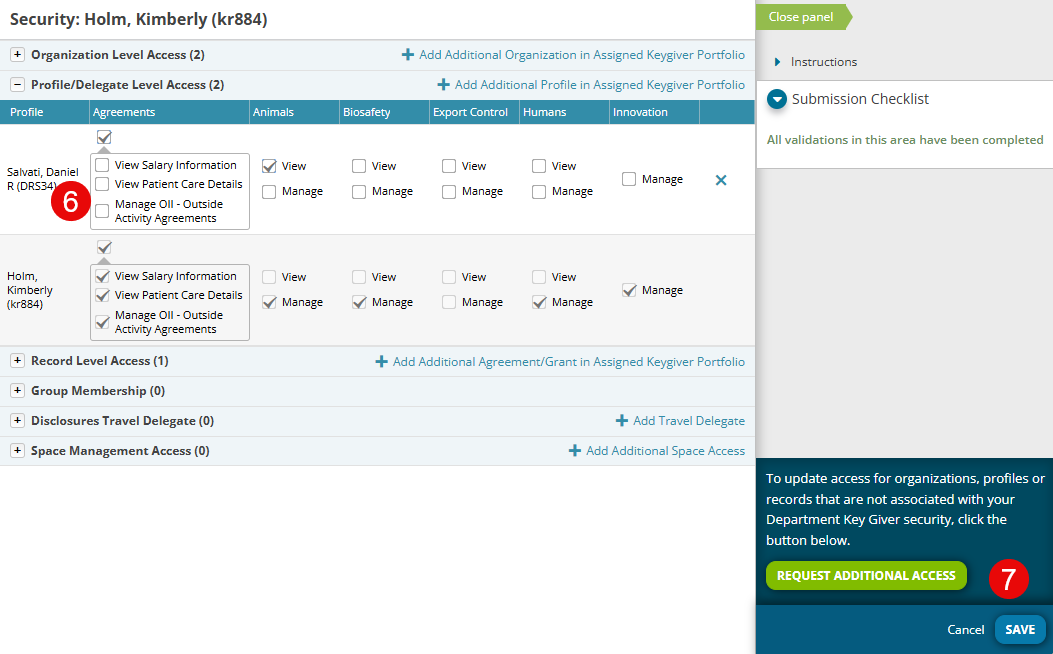
- Click “Add Additional Profile”.
- Search for and select the profile(s) to add – search by name or User ID.
- Click the Apply button.
- Select the appropriate attributes for the profile.
- Click Save when complete.

Additional Guides
- Requesting Security
- Add/Update Organization Level Access
- Add/Update Agreement/Grant Level Access
- Add Space Management Access
- Terminate Access
- Using Research Contacts
- Add New Research Contact
- Reassigning a Research Contact