
Posted on
Updated on
September 18, 2026
Introduction
Keygivers can add additional contacts that they manage based on their role and associated organization assignment.
Steps
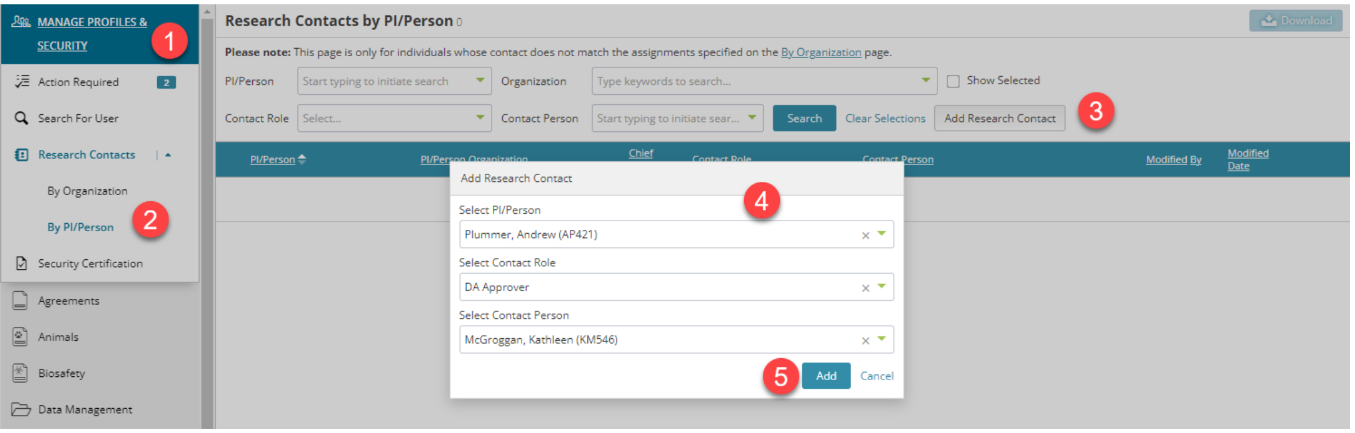
1. Go to Manage Profiles & Security module.
2. Expand Research Contacts and select “By PI/Person”.
3. Click the “Add Research Contact” button. A popup will open.
4. Add the PI/Person, the contact role and the direct contact for this PI/Person.
5. Click the “Add” button.
6. The page will refresh to show assigned contacts by PI.
Important Notes
- Assignments of direct contacts on this page are currently only used for the Agreement’s Submissions process.
- This page will only list a contact for a PI/Person if it has been assigned directly. Assigning a direct contact is at the discretion of the Department Keygivers and central offices.
- If you search by a PI/Person and a contact is not returned, please use the “By Organization” page to locate the contact by the PI/Person’s associated organization.
- Not all department roles can be assigned by PI/Person.
Additional Guides