September 16, 2026
Introduction
The Clone Agreement function is used to create a copy of an existing record which includes all data from the original record with the exception of Deliverables, Summary Notes and Grants/Financial Information. All records, except those with the Record Type of Fund Management, can be cloned.
Steps
- Click Agreements and open an existing agreement.
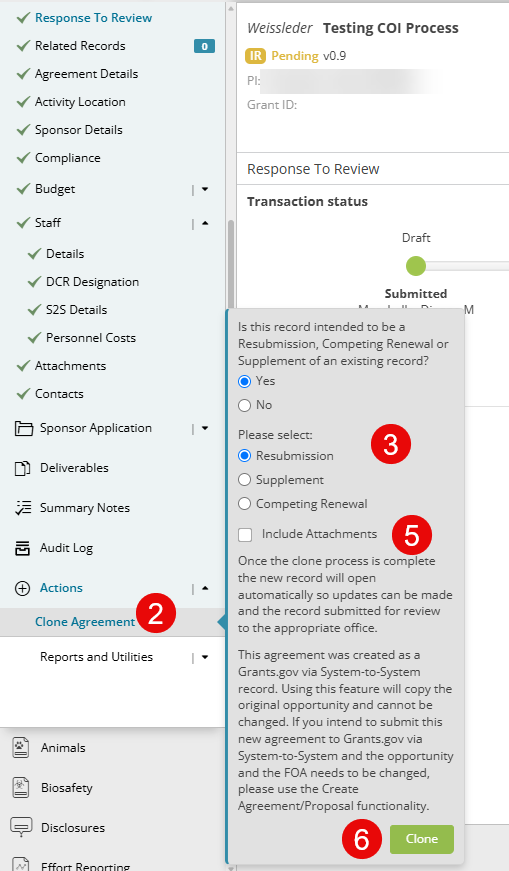
- From the Actions menu in the left, select Clone Agreement.
- If the record you are cloning is a funded record type through Research Management Pre-Award, you will be asked to indicate if this record is intended to be a Resubmission, Competing Renewal or Supplement.
- Selecting Yes will link the new record to the existing with the selected type.
- Selecting No will allow you to clone the record as a brand new, independent record.
- All other record types will be a standard clone request.
- Choose to clone with or without attachments (default is without)
- Click Clone
- Cloned records are linked to the original record on the Related Records page.
|
Important Notes: If the original agreement was submitted as a Grants.gov application via System to System using this cloning feature will copy the opportunity and it cannot be changed. Use the Create Agreement functionality to create the agreement with a new opportunity or without S2S feature. There are specific rules for creating Resubmissions, Competing Renewals and Supplements and you may be prevented from creating new records and linking them with these relationships if the rules are not met. If you have questions about this while cloning, please contact your Pre-Award Grant Administrator. |