
Posted on
Updated on
September 24, 2026
This guide provides step-by-step instructions for creating, completing, submitting, and tracking amendments to Institutional Animal Care and Use Committee (IACUC) protocols in Insight. It also explains key amendment activities, including updating research objectives, adding or removing study staff and funding sources, completing required sign-offs, and responding to reviewer comments.
|
STOP: If you only wish to add or modify staff on the protocol, instead utilize the “Create Staff Updates”. While you can utilize the “Create Amendment” action to add staff at the same time as a scientific amendment, you may be prompted to complete additional questions in the protocol if you utilize this route. |
STEPS
- Click Animals
- Select an existing active protocol from the landing page for which you would like to make changes.
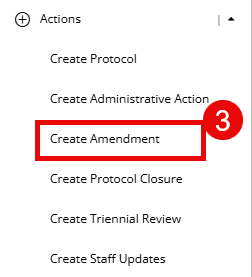
- Select Create Amendment under the Actions menu on the left navigation panel.
- You will be prompted to complete the IACUC Amendment form.
- Select the additional forms you wish to edit from the left-hand navigation OR select “Forms” to display the list of forms. Learn more about forms with these guides:
- Edit/Complete the desired form(s). Changes will display in green for new text or in red for removed text. To turn off the track changes view, select “Turn off Track Changes” at any time at the top of the screen.
- The following forms do not automatically display but can be added to a protocol:
- Breeding
- Controlled food or fluid intake
- Multiple survival surgery
- Restraint & device acclimation
- Tumor production
- Users may add as many Research Objective, procedure, anesthesia, or all administrative agent forms as needed.
- The Research Objective form is designed to cover each distinct series of experiments to be performed under the protocol. For example, if your protocol includes a stroke model and a kidney ischemia model, then you would have two distinct research objectives.
- Update other areas as needed:
- Complete all questions. Questions not yet addressed will display in the Submission Checklist until complete. Forms or sections with remaining questions to be addressed will be labeled with a red exclamation point.
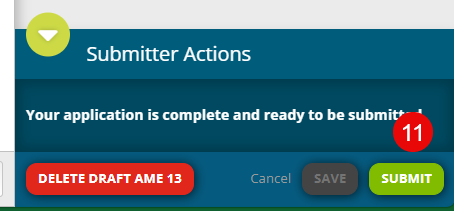
- When all forms are complete, submit the transaction by clicking the "Submit" button in the bottom right of your screen. This button will not be available until all sections of the protocol application are complete.
Additional Guides:
- Deleting transactions
- Online review/comments
- Completing an action
- Check the status of a transaction
- Generating an approval letter
- Training Lookup