
Posted on
Updated on
September 15, 2026
Introduction
This guide explains how to check for expired AALAS training requirements associated with animal protocols in Insight. It covers how to locate a protocol, review training status from the Staff tab, identify expired courses, and access the AALAS Learning Library to complete required training. It also includes important considerations for staff who work with multiple species or no longer participate in animal research.
Steps
Prerequisite: user is logged into Insight
- Locate any protocol where you are listed as study staff by clicking Animals and the Search button. The list presented (by title and number) will include all protocols on which you are listed as Study Staff or Non-Study Staff.
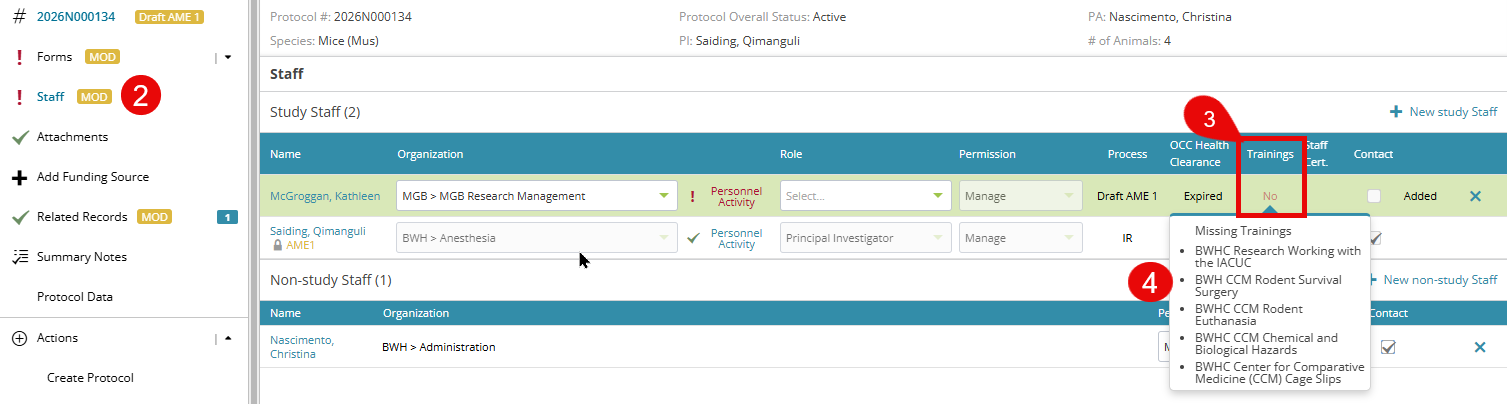
- To check if you have expired trainings for a particular protocol, click on the link to open the record and then navigate to the Staff tab in the left navigation.
- Locate your name in the list of staff members in the middle and click the word No under the Trainings column.
- A list of expired trainings will be presented.
You can complete these trainings in the AALAS Learning Library. Completion of these trainings is a requirement for approval of ANY amendment, triennial review, or new protocol.
Tip: Click the "Close Panel" in the top right to get a better view of the Staff tab.  |
Notes:
|