Posted on
Updated on
October 2, 2026
The Innovation Invention Disclosure Form is the official mechanism for disclosing an invention or discovery to the Innovation office. Completing and submitting this disclosure to the Innovation office is required to comply with the Mass General Brigham Intellectual Property Policy, non-federal sponsor agreements, and federal law.
Follow the steps below to begin a new invention disclosure.
Please Note: The invention has not been submitted to the Innovation office until all active MGB employees listed on the disclosure have reviewed and electronically submitted the disclosure. After the submitter starts the workflow, it will route to the Invention's MGB PI and all other MGB creators who are still active at MGB for the electronic approvals.
- Open Insight
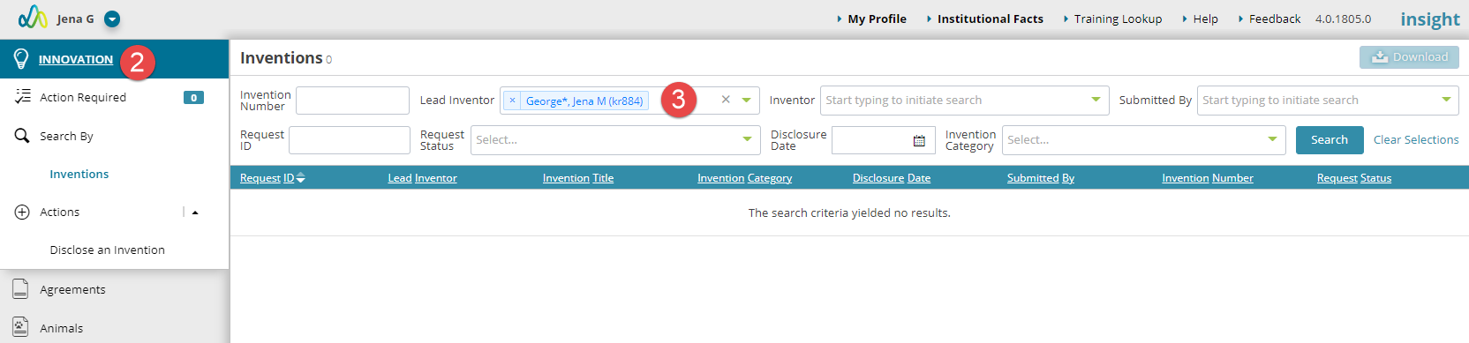
- Click the Innovation link in the left navigation.
- The Innovation module landing page will open. By default, the search will list you as the lead inventor. This can be removed or updated to another team member. Until Inventions are added in which you are listed as an Inventor there will be no results in the search.
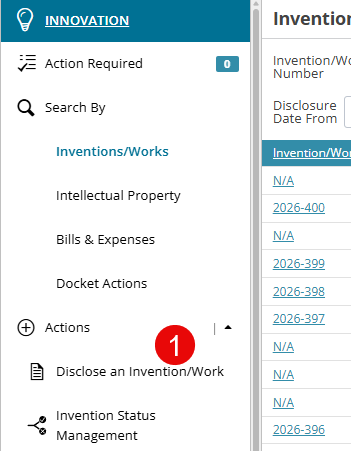
- Click “Disclose an Invention/Work” under Actions.
- The initial form questions will open.
- Add a title for your Invention
- Select the category of the Invention.
- Enter a past or future date when this invention will be publicly disclosed and where.
- Select the MGB PI. Click “Assign to me” if you are the invention's MGB PI.
- Confirm the organization the invention is being submitted under. Note that this defaults to the Lead Inventor’s primary associated organization.
- Click the “Create” button.
- Your draft Invention Disclosure is now created, and the additional information can be completed.
Click here for guidance on completing invention disclosures for diagnostic-related technologies
Click here for guidance for Inventors for Software-related question.