
Posted on
Updated on
September 24, 2026
The Create Staff Update action lets users make staff updates to an existing protocol registration and submit it to the MGB Institutional Animal Care & Use Committee (IACUC) for review.
STEPS
- Click Animals.
- Select an existing active protocol from the landing page for which you would like to create an amendment.
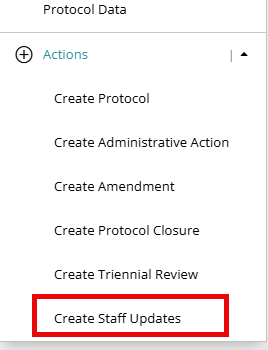
- Select Create Staff Updates under the Actions menu on the left navigation panel.
- The STAFF pages for the protocol are unlocked for modifications. If you need to edit additional forms, please delete the transaction and create an Amendment transaction instead.
- Click the Staff section on the left navigation panel. For detailed information on updating staff, click here.
- When all the sections are complete, the Submit button gets enabled at the bottom right corner of the screen. Click Submit.
- Upon submission, a transaction status bar is displayed, which represents the future flow of transaction progression.
| NOTE: AALAS trainings must be completed before submission of a study staff update. Failure to complete required training will prevent processing and approval of study staff onto a protocol. |
Additional Guides:
- Deleting transactions
- Online review/comments
- Completing an action
- Check the status of a transaction
- Generating an approval letter
- Training Lookup