Posted on
Updated on
September 15, 2026
Introduction
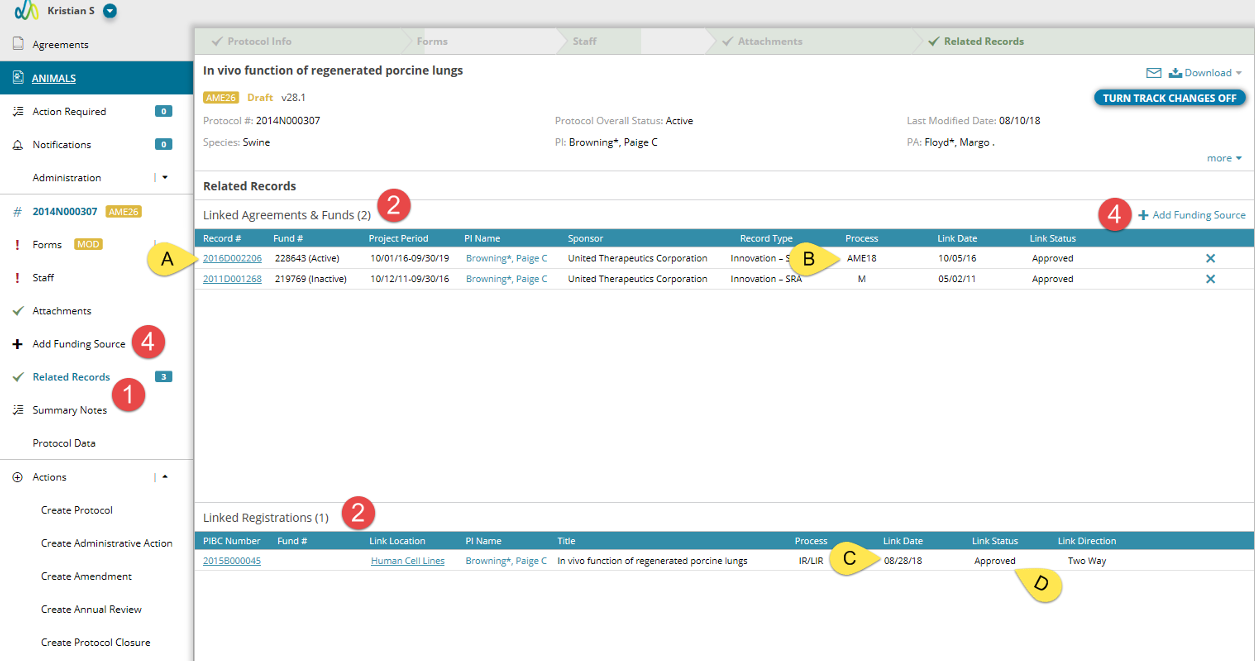
The Related Records page will display any Agreement records as well as Linked Registrations.
STEPS
- To navigate to the Related Records page, click on the link in the left navigation.
- The page has two sections:
- Linked Agreements & Funds are listed at the top. This list will also correspond to the Sponsors listed in the header of the protocol.
- Linked Registrations listed at the bottom show Biosafety protocols.
- Each listed record will include some general information regarding the record as well as:
- A link to the agreement/protocol.
- The process in which the link was added like Initial Review (IR) or Amendment (AME).
- The date in which the protocol to agreement linking was approved.
- The link status. This status will be Draft or Pending when the process to link the protocol to the record is still in progress.
- To add additional Agreement funding sources, please Create an Amendment and click “Add Funding Source” either in the right navigation or in the header of the page.
- Biosafety is linked via the Hazardous Agent Administration and Use form, Use of Animals form, or All Administered Agent.