Posted on
Updated on
September 24, 2026
Steps and additional guides to create a new Animal protocol in Insight.
STEPS
- Click Animals.
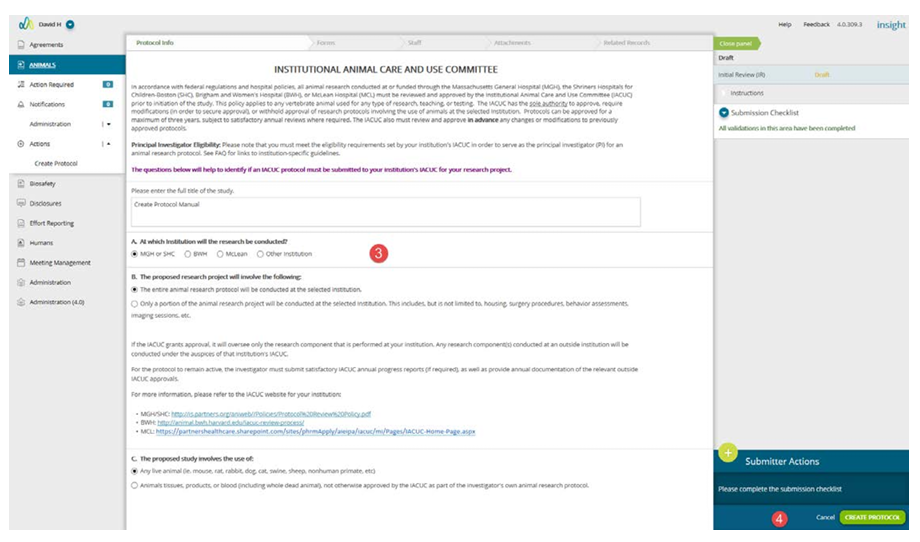
- Select Create Protocol under the Actions menu on the left navigation panel.
- Complete the Initial Survey form.
- When the submission checklist says ‘All validations in this area have been completed,' click Create Protocol.
- Form pages will be presented for completion based on the answers in your Initial Survey form.
- For more information on adding or removing forms, click here.
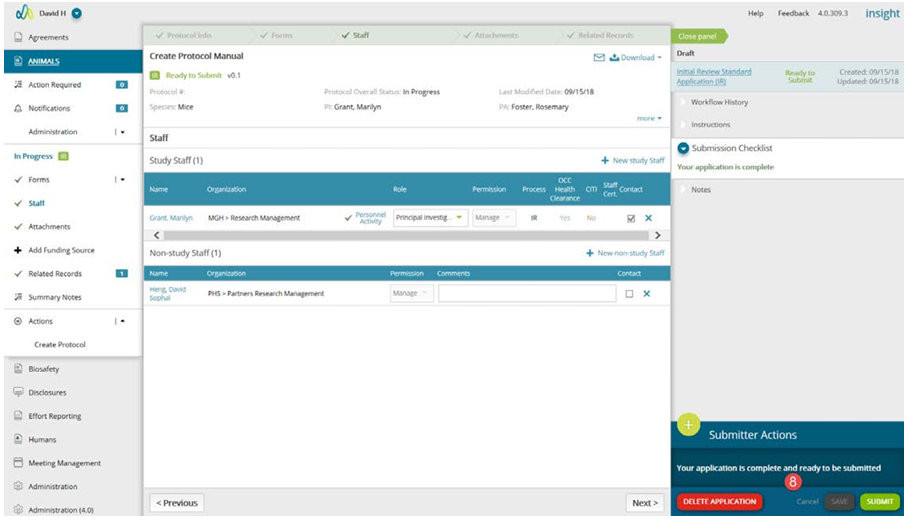
- After completing the form pages, navigate to Staff to add the Principal Investigator and additional Study and Non-Study Staff.
- For more information on the Staff page, click here.
- Certain attachments may be required once the forms are completed. Navigate to the Attachments page and review the list of required attachments in the Submission Checklist.
- For more information on the Attachments page, click here
- When all required fields and forms are completed, click Submit to initiate the workflow.
To learn more about any of the functions/pages within a transaction, click the appropriate link: