September 14, 2026
Residual Balance Transfer
Introduction:
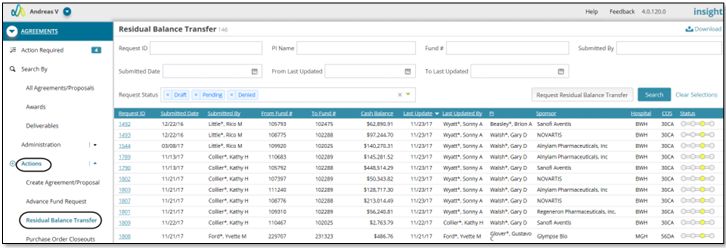
The Residual Balance Transfer page supports the ability to request residual cash balances to be transferred from clinical trials to research sundries. This page displays historical RBT records associated with logged in user based on their security.
Initiating a Residual Balance Transfer Request from Actions menu
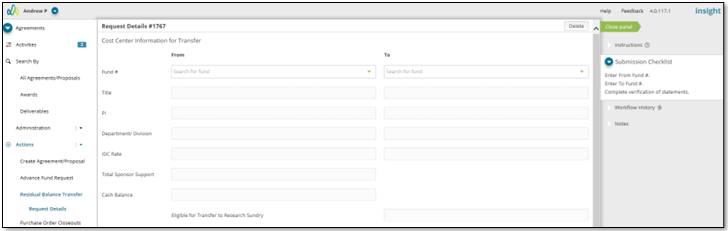
To initiate the residual balance transfer process, navigate to Residual Balance Transfer page directly from Actions menu and click "Request Residual Balance Transfer" button on the RBT landing page which redirects the user to Request Details page. After selecting the From Fund # (fund from which residual balance is being transferred), To Fund # (fund to which residual balance is transferred) and completing the verification of statements, the submitter can submit the residual balance transfer request.
Illustrative Screenshots
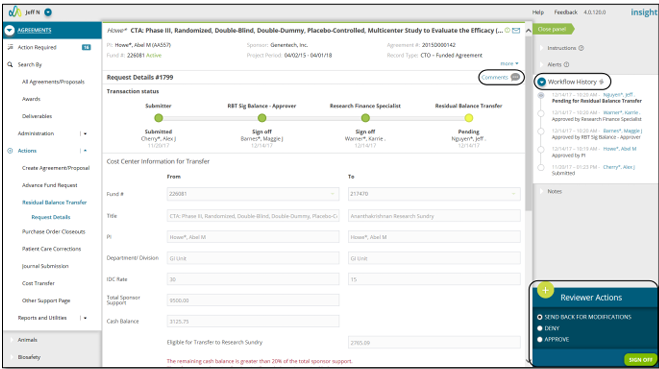
Upon selecting an existing record, user is directed to Request Details page where they have the ability to approve, deny or send the request back to submitter for modifications based on the role. Status bar at the top displays displays current status with date/time stamp along with the approver the request is currently with. ‘Workflow History’ section on right panel displays entire workflow tied to the selected record.
Illustrative Screenshot

Initiating a Residual Balance Transfer Request from within a record:
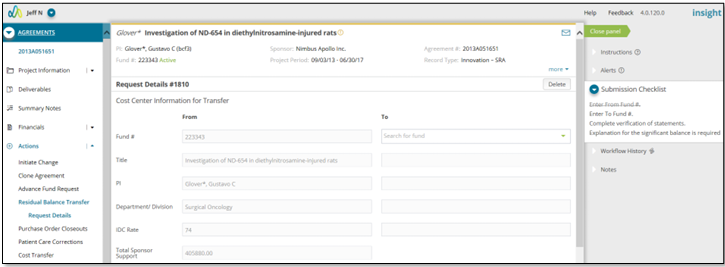
Residual Balance Transfer request can also be initiated from within a record. Choose a record from Awards Search page from which you want to make a residual balance transfer. Navigate to Residual Balance Transfer from Actions menu and initiate a request. In this case, the From Fund # is already populated on the Request Details page.
Illustrative Screenshot