September 21, 2026
This functionality that digitizes the paper-based transfer out documentation required when researchers transfer out of MGB. This functionality is specifically designed to create a simplified electronic submission and workflow for documentation required when a researcher leaves MGB. The functionality encompasses all elements involved when transitioning out -- grants, IRB and IACUC protocols, workspaces, equipment and much more. All forms are consolidated into a single packet, thereby streamlining the process for researchers. The Transfer Out process can be initiated by the PI, researcher, or their delegates. Each form is automatically populated with data already present within Insight, including demographics. Once submitted, the forms are routed to the relevant department for review and approval, prompting strategic conversations about the researcher’s exit plan. After the department review is complete, the complete packet is automatically routed to the Chief and SVP of Research for final approval.
Steps to submit
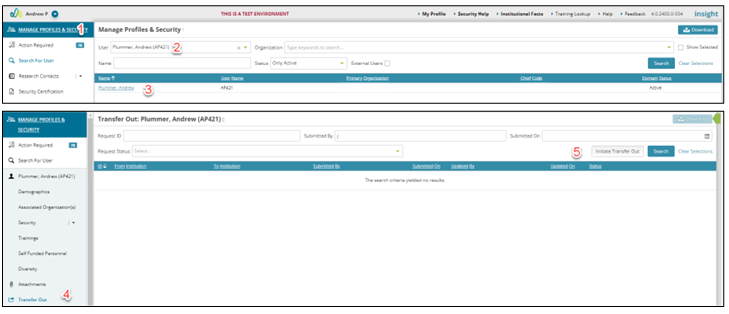
1. Navigate to Manage Profiles & Security module.
2. Search for the person that is transferring out.
3. Click on the person’s name
4. Select the transfer out option in the left navigation.
5. Click “Initiate Transfer Out” on the transfer out landing page
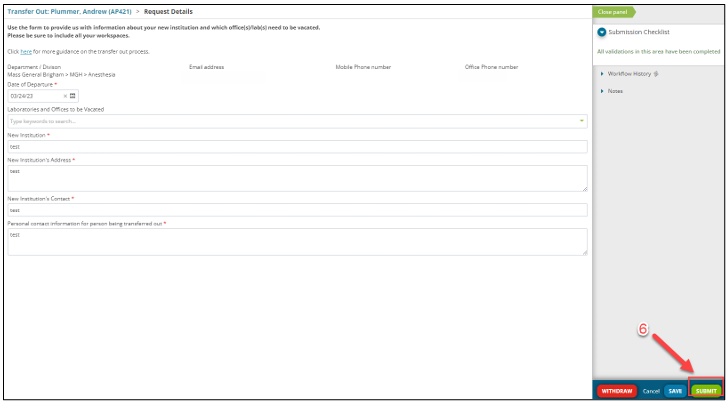
6. Complete all required fields on the gating form and click submit
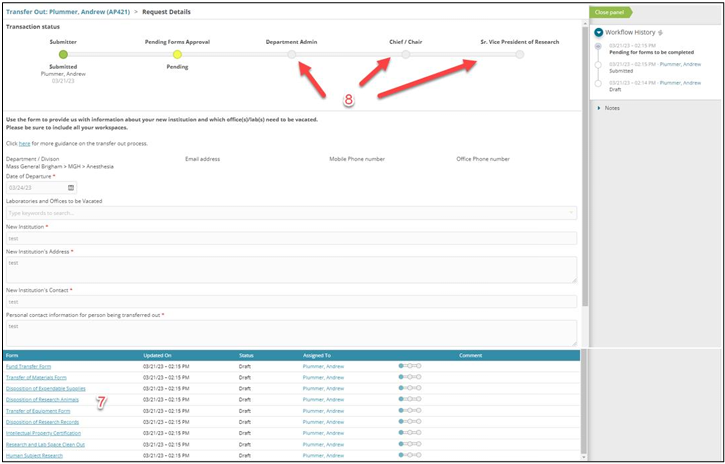
7. After submission all required forms will be generated and the PI or delegate must complete each form or mark as not applicable. Some forms require an additional level of approval as they are completed while others move on directly to a full package review. Form level approvers have the option to approve or send back for modifications with comments
8. After all individual forms have been complete the transaction moves onto a full package review by the DA, Chief and SVP of Research to complete the process. Each step in the review will have the option to approve or send back for modifications if needed.