September 14, 2026
Closeout Transaction
Introduction:
Department users can submit requests for Deficit Write Offs (DWO) and Small Balance Write Offs (SBWO) through Insight. Similar to Residual Balance Transfers, once submitted and approved, the appropriate journal entry will be posted by Research Finance to make the Cash Balance of the fund $0 so it can be inactivated.

Steps:
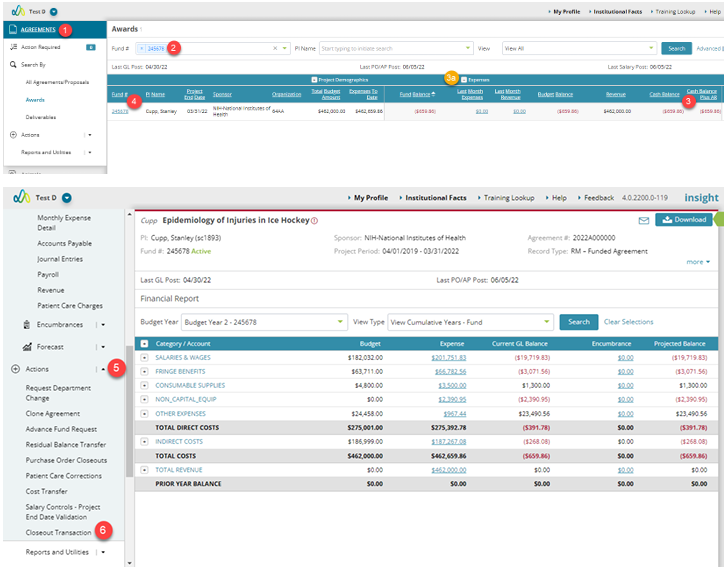
1.Navigate to the Agreements module.
2. Search for the fund for which you want to initiate the Closeout Transaction.
3. Verify that the deficit is a cash deficit and not a budget deficit, either on the Awards search page or within the fund itself.
a. On the Awards search page, expand the expenses section to see the cash balance.
b. Funds will often have a non-zero budget balance even when the cash balance is $0 because Insight budgets round to the nearest dollar. Therefore, unless total expenses are a whole dollar amount, a budget balance will exist where a cash balance may not.
4. Open the record for that fund.
5. Expand the “Actions” section in the left side bar.
6. Click “Closeout Transaction”
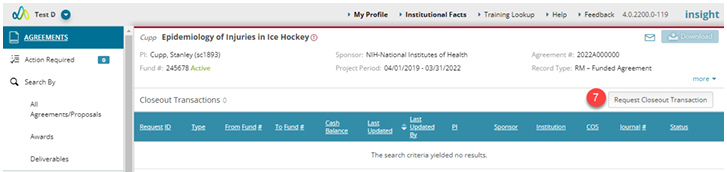
7. On the Closeout Transaction page, click the button toward the top right corner of the page that says “Request Closeout Transaction”
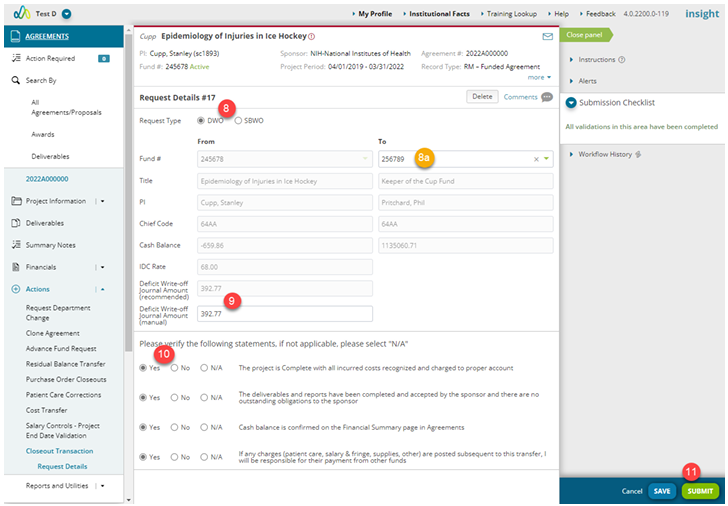
8. Select the appropriate request type, Deficit Write Off (DWO) or Small Balance Write Off (SBWO).
a. If selecting a Deficit Write Off, enter the Sundry fund to be used for the write off in the “To” section.
b. If you select a Small Balance Write Off, the Small Balance Write Off fund should auto-populate in the “To” section.
9. Insight automatically calculates what the write off amount should be based on the transaction type and, if a Deficit Write Off, based on the project end date. If you know of something that will be posting in the current month that will change the amount of the write off, you can adjust the “Deficit Write-Off Journal Amount (manual)” field to what you believe the write-off amount should be.
10. Verify and answer the statements below the fund information.
11. Click the Submit button.
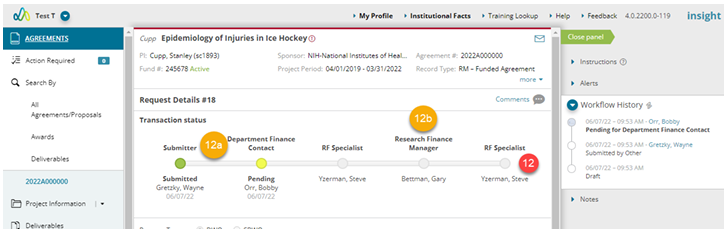
12. Once the workflow is completed, the journal entry will be posted.
a. If the transaction is submitted by someone other than the Department Finance Contact, the transaction will need to be approved by the Department Finance Contact before the workflow continues.
b. Deficit Write Offs will require approval from the Research Finance Manager whereas Small Balance Write offs will go directly to the Research Finance Specialist.
Reminders:
Illustrative Screenshots