September 14, 2026
Patient Care Corrections
Introduction:
The Patient Care Corrections page supports the ability to request patient charges to be moved or added to a fund. The status of this process can be viewed anytime on the Patient Care Corrections section under Actions menu.
Initiating a Patient Care Corrections Request:
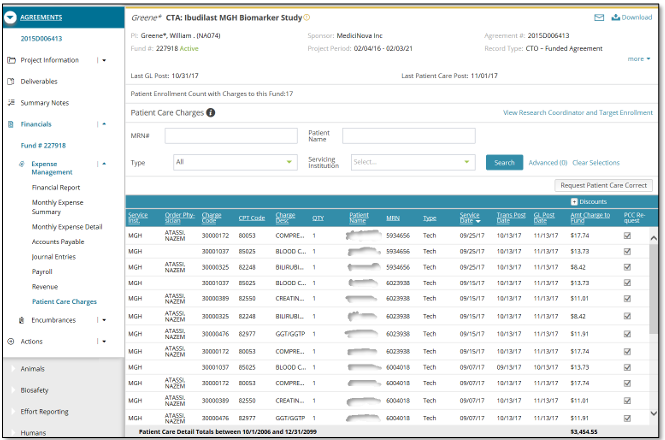
Navigate to Patient Care Charges page under Expense Management section. If the charges to be corrected are displayed on the fund, select the checkbox(es) under PCC Request column associated with the charge. You will have the ability to select multiple records for Patient Care Corrections. If you do not find the charges to be corrected, click on the 'Request Patient Care Correct' button displayed above the grid. You will be navigated to Patient Care Correction Form to initiate the request process.
Illustrative Screenshot
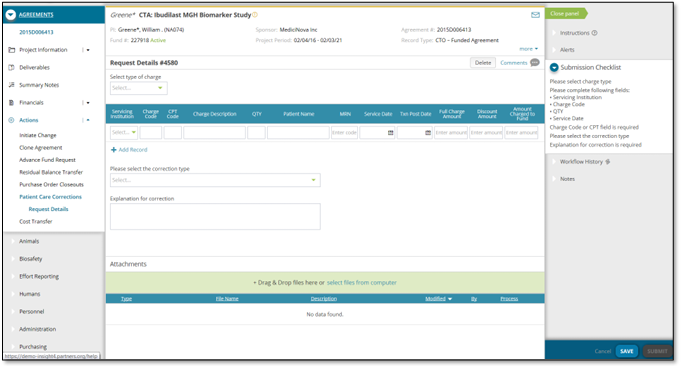
Complete the required fields and submit the request. Patient charges that are 90 days old (since post date), will require “A Late Cost Transfer” justification. This is required for fund to fund transfers only. You can navigate to the Patient Care Corrections landing page to view the record(s) created for the request initiated. All the requests associated to the specific fund selected are displayed on this screen. Status bar at the top displays current status with date/time stamp along with the approver the request is currently with.
The submitted request is sent to Research Hospital/Professional Billing Approver who has the ability to Approve, Deny or Send the request back to the submitter for modifications. Note the Workflow History section on the right panel which displays the entire workflow corresponding to the selected request with date/time. As part of the approval process, the approver has to sign off on the request by providing their credentials.
Illustrative Screenshot
Patient Care Corrections from Actions menu:
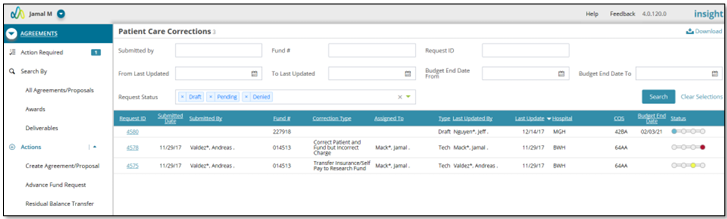
The Patient Care Corrections page under Actions menu displays historical PCC records associated with logged in user based on their security. Existing requests can be reviewed on the Patient Care Corrections landing page by performing search. You can drill into the record by clicking on corresponding Request ID and you will be navigated to the Request Details page for the request.
Illustrative Screenshot