September 14, 2026
Advanced Fund Request
Introduction:
The Advanced Fund Request page supports the ability to request an advance fund for projects that are going to be funded but are awaiting final contract execution. This page displays historical AFR records associated with logged in user based on their security.
View existing Advanced Fund Requests:
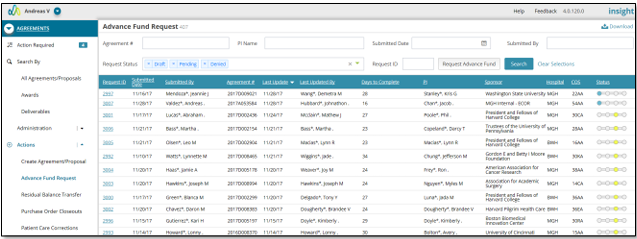
Existing Advanced Fund Requests can be reviewed by navigating to AFR landing page from Actions menu. Customized search can be performed by applying filters on the search criteria to view records with various Statuses, Agreement#, PI Name, Submitted Date, Request ID and Submitted By User. The resultant data displayed on the grid can be sorted in ascending and descending order by clicking on the column names. There is an option to download the resultant data to a CSV file.
Illustrative Screenshot:
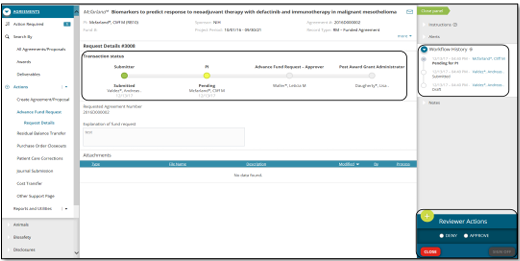
Click on the Request ID link for any record to open the correspoding AFR request submitted. Upon selecting an existing record, user is directed to Request Details page where they have the ability to approve, deny or send the request back for modifications to the submitter based on their role. The transaction status bar at the top displays displays current status with date/time stamp along with the approver the request is currently with. Note the Workflow History section on the right panel of the screen which displays entire workflow corresponding to this request with date/time.
Illustrative Screenshot
Initiating an Advanced Fund Request from Actions menu:
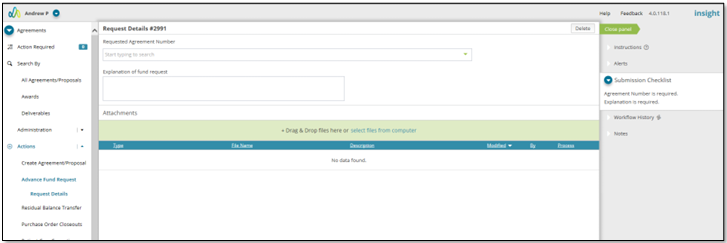
Click 'Request Advance Fund' button on the landing page. User is directed to AFR Request Details page. Enter Agreement Number AFR is being requested for and select from the type ahead drop down field. Enter explanation for fund request and submit the request.
Illustrative Screenshot
Initiating an Advanced Fund Request from within a record:
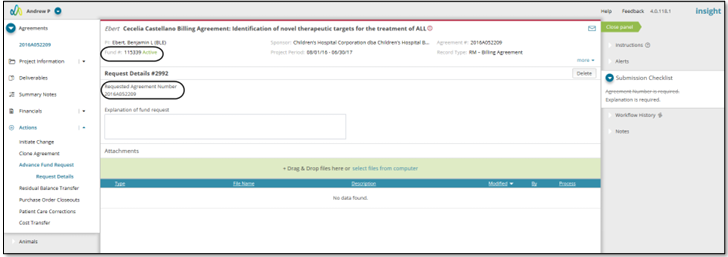
Advanced Fund Request can also be initiated from within a record. Choose a record from Awards Search page for which you want to initiate an advanced fund request. Navigate to Advanced Fund Request section from Actions menu and initiate an advanced fund request. In this case, this form is pre-populated with project information as the AFR page is being accessed at record level.
Illustrative Screenshot