
September 14, 2026
Encumbrances
Introduction:
Encumbrances section in Agreements has various pages displaying encumbered data against the selected fund. It displays expenses which have not yet hit the General Ledger. Select a Fund# from Awards search landing page and navigate to Encumbrances section from left navigation bar. The Encumbrances menu consists of various sections such as Accounts Payable, Salary, Open POs, Revenue, Subcontracts and Journal Details. All these sections/pages can be accessed by clicking on the corresponding page name.
Illustrative Screenshot
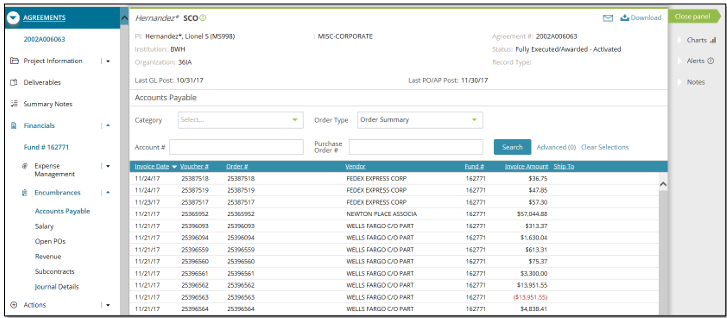
Encumbrances Menu
Accounts Payable – This page provides a list of all invoices that are encumbered against the selected grant or fund. The order view defaults to 'Order Summary'. Order type can be modified to 'Order Details' in the search criteria for additional information corresponding to the records displayed.
Salary – This page displays both the current and future salary expenses for a specific fund. Start and end date on the project, and other information such as annual rate, monthly/weekly rate, remaining months/weeks, salary, fringe rate, committed fringe and total committed salary on a project are displayed in this section.
Open POs – This page provides a list of all purchase orders that are encumbered against the selected grant or fund. The order view defaults to 'Order Summary'. Order view can be modified to 'Order Details' in the search criteria for additional information corresponding to the records. This page also supports the ability to close out unpaid purchase orders. This can be done by selecting unpaid POs using the checkbox and clicking “Submit PO Closeout” button on the page. The records submitted for closure will appear on the Purchase Order Closeout page from which it can be reviewed.
Revenue – This page displays encumbered revenue values for each account code corresponding to the research fund selected. The data on this screen is organized by account number and then by clicking on the “+” the revenue transaction details are listed.
Journal Details – This page provides a list of all journal entries that have not been posted to the GL (encumbered costs) since the last GL close date for the selected fund. There are no historical records displayed on this page unlike other pages.
Accessing Data:
When you are on any of the above pages, you can go back and forth between other pages under Expense Management, Encumbrances and Actions sections. You can find below features on all/most of the pages described above.
Project header – Project header is displayed at the top of the center workspace for all pages. Project/fund related information such as Investigator name, Sponsor, Agreement#, Fund#, Project & Budget periods, Institution/Organization, Award Number and Agreement status.
Download – There is an option to download the result set by clicking on Download button at the top of the screen.
Drill down capability – This feature lets the user know detailed information around a specific project or fund. You can identify this feature by clicking on any links displayed on the result set grid for a selected page.
Search – Necessary records can be displayed by filtering the search criteria accordingly.
Advanced – This feature helps in performing an advanced search on the result set displayed.
Right Navigation – Charts, Alerts and Notes are displayed on all the pages corresponding to the selected fund.