
Posted on
Updated on
September 18, 2026
Introduction
Certain contacts can now be assigned by PI. This configuration will allow for departments and central offices to better manage portfolios. This page is managed by Department keygivers.
Steps
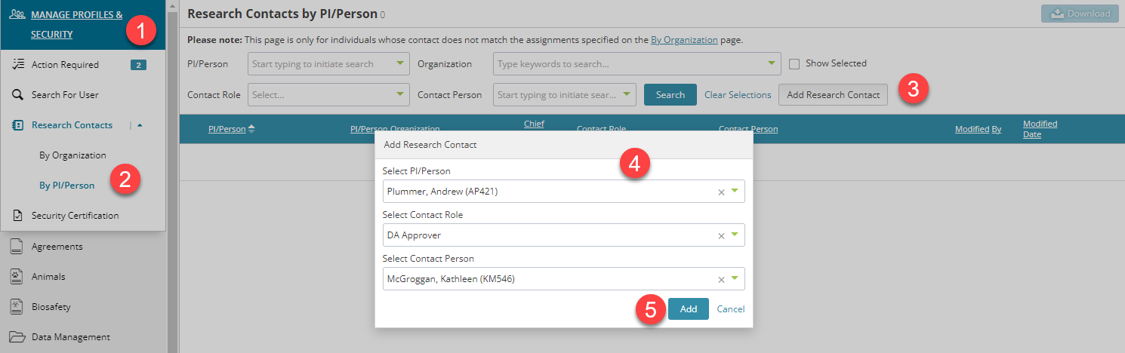
- Go to Manage Profiles & Security module.
- Expand Research Contacts and select “By PI/Person”.
- Click the “Add Research Contact” button. A popup will open.
- Add the PI/Person, the contact role and the direct contact for this PI/Person.
- Click the “Add” button.
- The page will refresh to show assigned contacts by PI.
Important Notes:
- Assignments of direct contacts on this page are currently only used for the Agreement’s Submissions process.
- This page will only list a contact for a PI/Person if it has been assigned directly. Assigning a direct contact is at the discretion of the Department Keygivers and central offices.
- If you search by a PI/Person and a contact is not returned, please use the “By Organization” page to locate the contact by the PI/Person’s associated organization.
- Not all department roles can be assigned by PI/Person.
Additional Guides
- Using Research Contacts
- Add New Research Contact
- Reassigning a Research Contact
- Requesting Security
- Add/Update Organization Level Access
- Add/Update Profile/Delegate Level Access