Posted on
Updated on
August 19, 2026
Introduction
Users can update their own or other user’s email addresses if listed incorrectly.
Steps
- Go to Manage Profiles & Security module.
- Locate the user
- The search will default to the user logged in.
- Use the name field to enter “last name, first name” or NT login to locate the user you need to review/update.
- Click Search.
- When results are returned, click on the user’s name to open their profile.
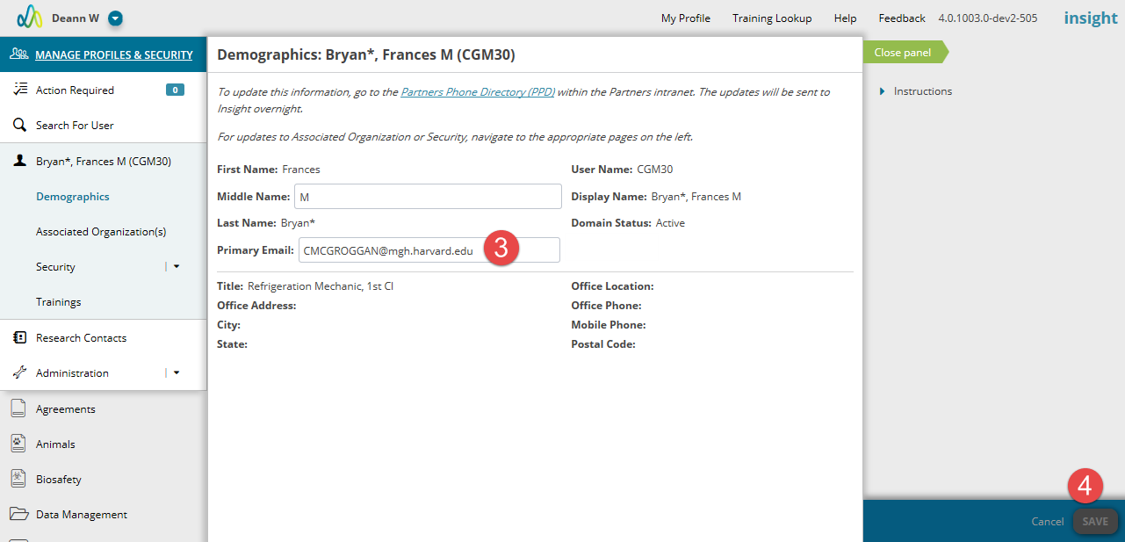
- On the Demographics page, update the email address.
- Click Save.
| Note: Only MGB approved email addresses can be added to profiles. Please see a list of approved extensions below. If an acceptable email address extension is entered BUT is spelled incorrectly it will produce an error. |
| Note: Although updates to email addresses do not need to be approved, a notification will be sent to the Department Keygiver for the user’s primary chief code. |