
July 20, 2026
This article is for current GraphPad Prism users who purchased a subscription renewal through the Digital Research Computing Core. For each computer on which GraphPad is installed, the user must complete the following steps in order to update the serial number.
You can update the serial number before the expiration of the old license at any time, the new serial number will be valid immediately.
You will receive the serial number upon renewal. Email @email if you have any questions or concerns about your GraphPad Prism Renewal.
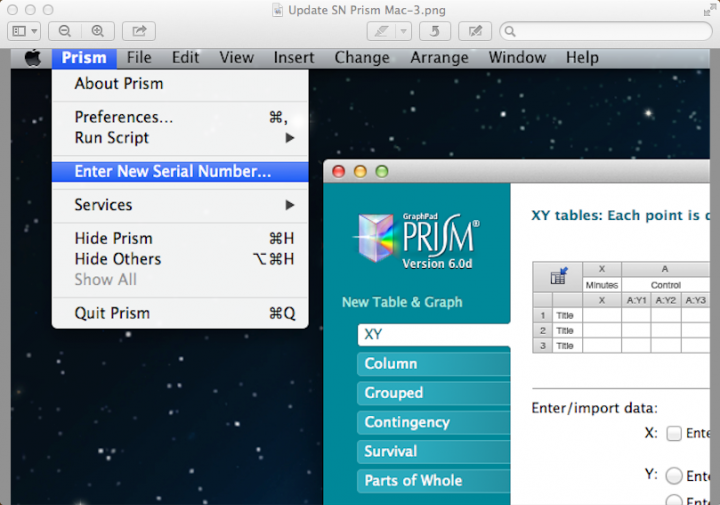
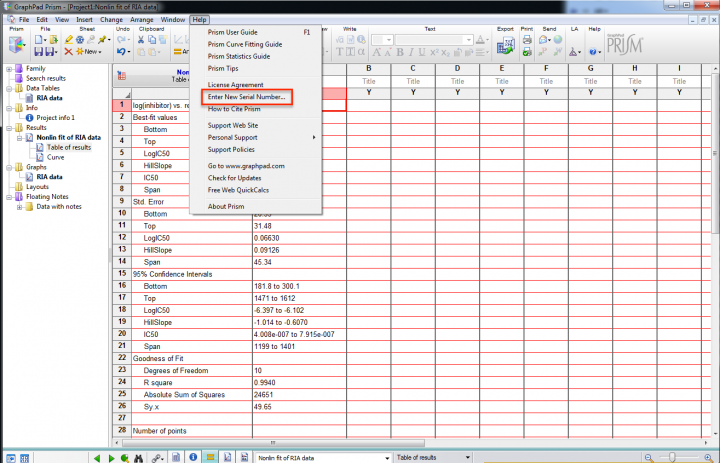
2. Go to the Prism Help menu and enter a new serial number.
• See a Macintosh Computer Screenshot
• See a Windows Computer Screenshot
3. Once you enter the new serial number, you will be prompted to register the license. GraphPad Prism will then generate and email you a new activation code.
4. Use this activation code to complete the registration of the new license on your machine.
GraphPad Prism software subscriptions are offered at considerable discount through the Digital Research Computing Core. The subscription term lasts from September 1 -August 31st annually. To learn more about this service, please visit: https://rc.partners.org/research-apps-and-services/academic-software#graphpad-prism